
Ready to try eSIMs and change the way you stay connected?
Download the Airhub app to purchase, manage and top up your eSIMs anytime, anywhere!

For many travellers, one key question is does hotspot use data when they share their phone’s internet connection with other devices. The answer is yes: a personal hotspot essentially turns your smartphone into a portable Wi-Fi router, so anything that taps into it will eat into your cellular data allowance just as if you were browsing directly on your phone. In this post, we will learn more about how hotspots work on different network carriers.
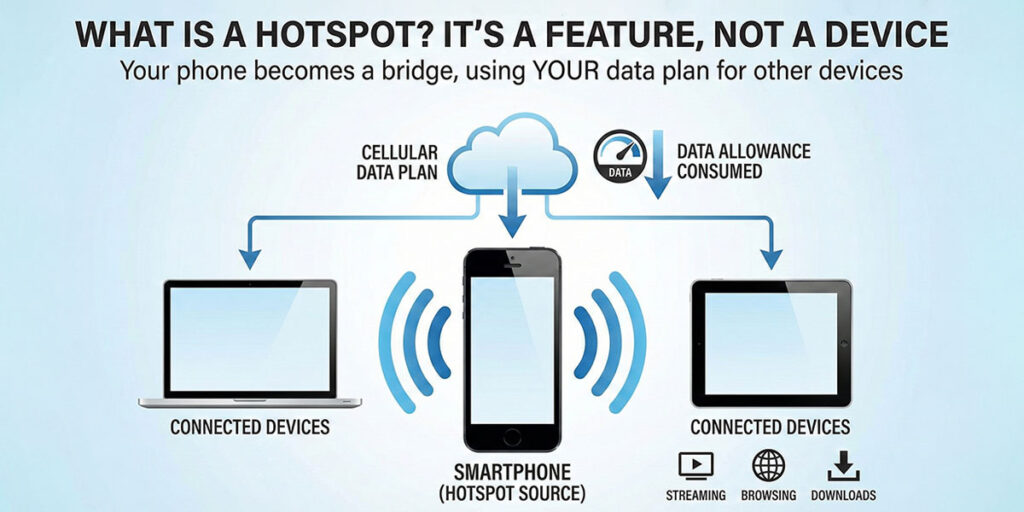
Many people wonder, “Does Hotspot use data, or is it a different device?” A hotspot is not a different device that you have to buy to use data. You can create any cellular device into a hotspot similar to a Wi-Fi router just to connect to the internet. You can enable a hotspot through your device settings. Once you turn your device’s hotspot on, you can connect any other cellular device to the internet. The data usage comes from your data plan. Anything that you do on the connected devices uses your data plan to work.
After all, what uses data on a cell phone? Everything internet-related: video calls, social media, web browsing, app downloads, and so on. A hotspot simply provides a bridge for these activities on another device. If someone streams a movie through your hotspot, that data is coming from your cellular allowance; there’s no free data hidden in a hotspot.

Using a device hotspot is a very simple process that you don’t have to struggle with:
The difference between Hotspot and Wi-Fi is evident as follows:
| Aspect | Phone Hotspot | Wi-Fi Network |
| Internet source | Uses your phone’s cellular data | Uses home/office broadband or public Wi-Fi |
| Coverage | Short range (a few metres from the phone) | Wide range (entire house or building) |
| Speed | Depends on mobile signal (often slower) | Generally faster and more stable (ISP-based) |
| Data limits | Limited by your mobile plan’s cap | Usually unlimited or much larger (ISP plan) |
| Battery impact | Runs off your phone’s battery (can drain it quickly) | The router has its own power; your phone battery is unaffected by network sharing |

Now you know the answer to does Hotspot uses data. How much data does Hotspot uses depends on what you’re doing:
So if you are wondering, “Can a Hotspot run out?” It can, and that’s why we suggest you buy an eSIM.
For travellers, “What is eSIM?” is a key question. It’s a digital SIM embedded in many modern phones that lets you activate mobile data plans without a physical SIM card. There are many new eSIM compatible devices (iPhones and Android models), so you can just select and install a plan online with ease. An eSIM can hold regional or global data packages, for example, a plan for Europe or a world plan. Once installed, it gives your device a local or global data connection.
With an eSIM data plan active, your phone can work just like it has a local SIM. This means you can turn on your hotspot anywhere and share that eSIM data connection. Many eSIM plans explicitly allow tethering, so your phone can serve as an eSIM hotspot for your laptop or other gadgets. eSIM roaming plans often cover multiple countries at local rates, avoiding expensive roaming fees. In practice, you might buy an eSIM online before your trip (for example, using a service like Airhub). Then once you land, your phone will connect to the local carrier via the eSIM, and your hotspot will work on that data, often at local rates rather than costly international roaming charges.
When choosing an eSIM plan for hotspot use, consider your travel needs:
Airhub provides easy eSIM solutions for travellers. You can buy an eSIM online in minutes through the Airhub app or website, selecting a data plan for the countries you need. Once installed, your phone has local or global data coverage ready for hotspot use, without the usual roaming headaches. For hassle-free travel data, Airhub’s eSIM is a solid choice.
To answer the big question again: Does Hotspot use data? Absolutely, any device using your hotspot is drawing from your mobile data plan just like any other app. We’ve seen how hotspots function, compared them to home Wi-Fi, and looked at how much data different activities use. For travellers, using an eSIM is a great way to manage hotspot data internationally. With Airhub you can stay connected within your budget anytime, anywhere. So, switch and enjoy your hotspot as you want!
Hotspot works on your device’s data plan, so it only works till your plan lasts.
Hotspot does not consume extra data as it totally depends on what you are doing on your device.
If you are using an Android device, you will find your data usage in Network and Internet settings. If you are using an iPhone, you can check it in cellular in the settings.
eSIM is the digital substitute of a SIM card that gets configured completely online.
Download the Airhub app to purchase, manage and top up your eSIMs anytime, anywhere!

